Service Information for Web Targets
Once you've chosen the Target Name and Service Type, the SERVICE INFORMATION form fills in the Service Name field.
SERVICE INFORMATION
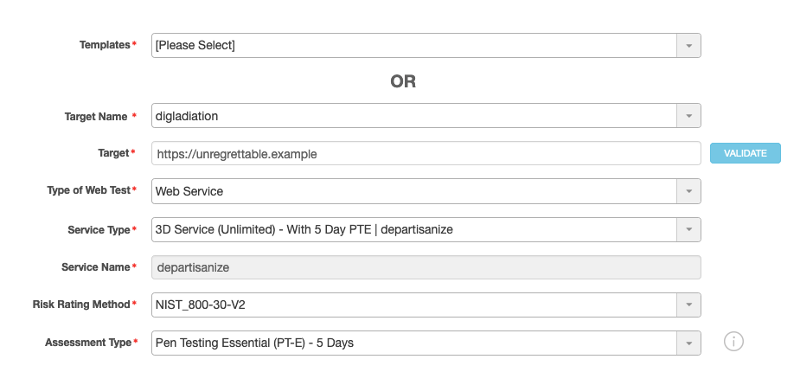
An asterisk (*) indicates a required field.
Templates : Select the test template that you want to use. A test template allows users to reuse test plans and schedules.
Target Name* : Choose the name of the target.
**Tip:** Instead of using the drop-down menu, you can start typing a name to access the test more quickly.
Target* : Choose the target application that your organization wants to test for security vulnerabilities.
VALIDATE button : Click VALIDATE to verify the URL specified in the Target field. The Managed Services site attempts to contact the specified target and check whether it is currently accessible over the Internet. If the target is accessible, a green check mark appears next to the Target field. If it is not accessible, a red ‘X’ appears: This means that the validation failed.
Failure can happen when the target site is offline. Failure can also happen when the target is behind a firewall or is located within a VPN.
Type of Web Test* : Choose the particular type of test you want to schedule: either Web Application or Web Service.
Service Type* : Choose a service type (or service name) from the drop-down list. This list displays only valid, unexpired service types for the chosen target. If you don’t see a service listed and you are trying to use an à la carte service, make sure you have assigned the target to a service.
**Note:** To view whether a subscribed service is still active or whether it has expired, navigate to **SERVICE** > **My Services**.
Service Name* : This field auto-populates with the service name associated with the service type you chose.
Risk Rating Method* : Choose one of the standard risk-rating methods by which you want your application to be rated.
Assessment Type* : (Required only for an unlimited 3D service.)
Choose which [type of assessment](r_msp_test_types.md#msp_guide_assessment-types) you want to have run.
Parent topic:Scheduling Tests for Web Targets