Viewing Tests by Status Category
You can view the status of a test from the TEST > Test Info page.
The Test Info page organizes tests by status categories.
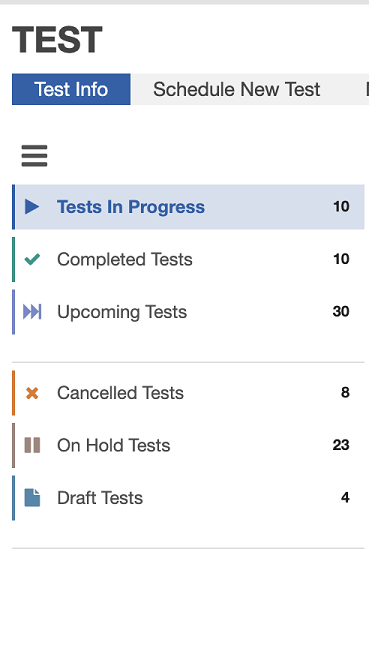
Status Categories for Tests
The icon above the list of categories expands or contracts the width of the list:

When you find the row for a test you are interested in, click the row to see more details about the test's status.
You can update most of the information for a test before a test completes.
At any given time, a test can belong to one of the following major categories:
Tests In Progress
A test in this state is currently running.
An in-progress test can be in one of several sub-states that describe the current stage of testing. Click the name of a particular test to see the progress status for that test. This panel appears on the right, along with test details.
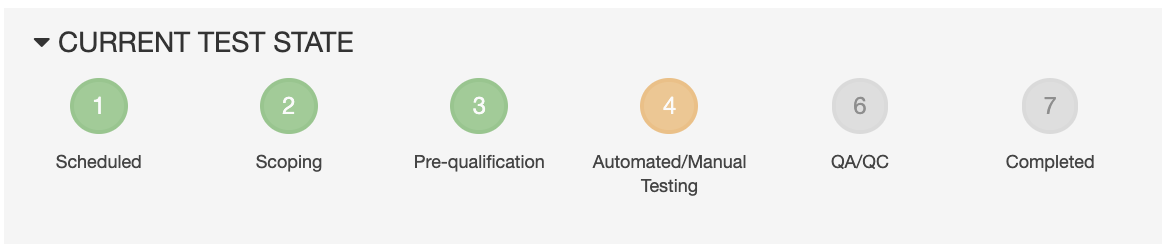
The number of sub-states, and their descriptive labels, can vary depending on what type of test this is.
Completed Tests
A test in this state has completed, and its report is available to view in your browser or to download.
After the test has completed, you can schedule a revalidation scan by clicking the Schedule Revalidation Scan icon in the Actions column.

Schedule Revalidation Scan icon
Upcoming Tests
When you schedule a test, it is immediately placed in the Upcoming state. The test information you provided has been sent to a Black Duck Assessment Center.
While the test is in the Upcoming state, you can edit it or remove it. The test remains in the Upcoming state until an assessor completes scoping and prequalification, and moves the scan to Automated/Manual testing. At this point the scan is moved to the Tests in Progress grid.
A test can also appear on one of these lists:
On Hold
A test can be moved into an on-hold state from any of the other states. A test is moved to on- hold at the customer's request, or due to a blocking issue in continuing the test.
Canceled Tests
Canceled tests can be rescheduled so that the you do not lose the service used to schedule this test in case you are using an a-la-carte service.
Parent topic:Checking the Status of a Test