Scheduling Information for Architecture Targets
The next page is where you specify information such as the test run date and any other files necessary for running the test.
The Main Schedule Page Controls
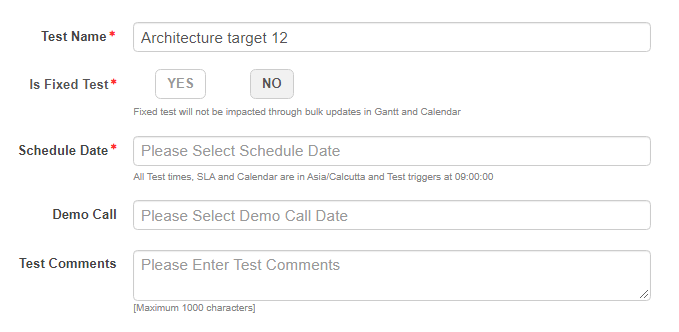
An asterisk (*) indicates a required field.
Test Name* : A name that identifies the test.
Is Fixed Test* : Marking a test as Fixed ensures that the scheduled date for this test is not affected by the rescheduling of other tests due to Gantt or Calendar operations.
You *can* change the scheduled date of a fixed test by using the **TEST > Test Info** page.
Schedule Date* : Use the pop-up calendar to choose a start date for the test.
For a 3D service, the calendar does not let you choose dates that are reserved for another scheduled test \(3D services only support one test at a time\).

For any type of service, 3D \(unlimited\) or limited, the calendar does not let you choose dates that do not allow a five day lead time for testing Production deployments. On the calendar, available dates are outlined, while unavailable dates are grayed out.

Based on the start date, the calendar automatically reserves the number of business days required to complete the test for the selected assessment type. For example, the NST-S-250IP assessment type requires five business days and NST-S-500IP assessment type requires ten business days.
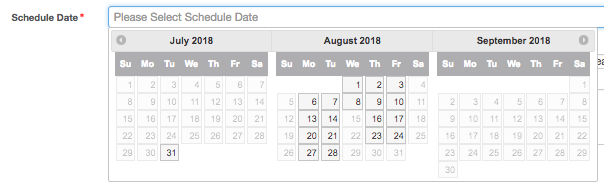
Calendar pop-up for choosing a test date
Demo Call : A Demo Call date is set before a scan's Schedule Date, so that demos and scoping forms are reviewed before a test is run.
Demo call dates should be set to later than the current date and before the test's **Schedule Date**.
Test Comments : (Optional) If you wish, you can enter comments here about the deployment and schedule for the test.
Parent topic:Scheduling Tests for Architecture Targets