Service Information for Mobile Application Targets
Once you've chosen the Target Name and Service Type, the SERVICE INFORMATION form fills in the Service Name field.
SERVICE INFORMATION
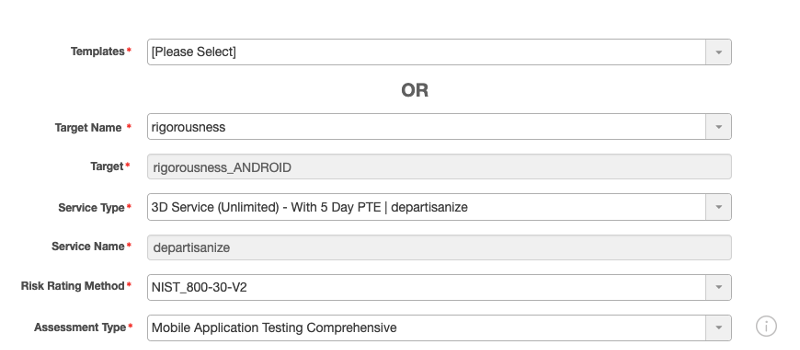
An asterisk (*) indicates a required field.
Templates : Select the test template that you want to use. A test template allows users to reuse test plans and schedules.
Target Name* : Choose the name of the target.
**Tip:** Instead of using the drop-down menu, you can start typing a name to access the test more quickly.
Target* : Choose the target application that your organization wants to test for security vulnerabilities.
Service Type* : Choose a service type (or service name) from the drop-down list. This list displays only valid, unexpired service types for the chosen target. If you don’t see a service listed and you are trying to use an à la carte service, make sure you have assigned the target to a service.
**Note:** To view whether a subscribed service is still active or whether it has expired, navigate to **SERVICE** > **My Services**.
Service Name* : This field auto-populates with the service name associated with the service type you chose.
Risk Rating Method* : Choose one of the standard risk-rating methods by which you want your application to be rated.
Assessment Type* : (Required only for an unlimited 3D service.)
Choose which [type of assessment](r_msp_test_types.md#msp_guide_assessment-types) you want to have run.
Parent topic:Scheduling Tests for Mobile Application Targets